Features built for pipe inspections
Vidsy AI supports end-to-end inspection workflows, from detection and measurement to review, export, and model improvement.
Three-dimensional joint displacement
Measure displacement in every direction
Vidsy Pipes detects and measures the three forms of displacement between adjoining pipe sections during live analysis and recording playback.

Radial displacement
Measure an offset when adjoining pipe sections move up, down, left, or right.

Axial displacement
Measure a gap along the pipe axis, including the minimum and maximum distance across the joint trace.

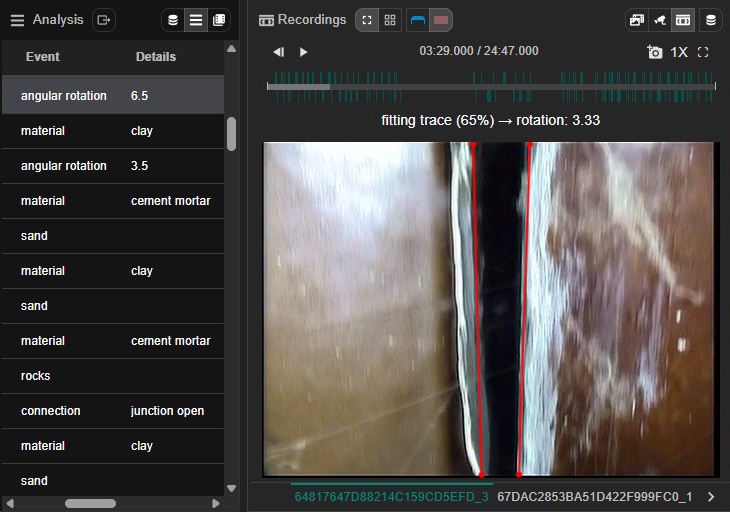
Angular displacement
Measure the angle between adjoining pipe sections when a joint rotates out of alignment.
Analysis & detection
- Live analysis and post-record processing: Switch between real-time and post-run processing for pipe inspections.
- Trend-aware box stabilization: Reduce distracting box jitter while following sustained position, size, and rotation changes in live analysis and recording playback.
- Event and state detection: Detect pipe shape, material, water flow, connections, displaced joints, cracks, collapses, and more.
- Calibrated real-world measurements: Calibrate a camera or recording to convert image distances into millimeters for real-world measurements.
- CPU/GPU flexibility: Run on CPU or accelerate with your GPU when available.
Inspector workflow
- Session controls: Start, stop, and re-run analysis; review events on timelines and in lists.
- Bundles & organization: Group runs by job or location, or import a CAMI project with its referenced recordings and calibration data.
- Event review: Jump to detected events, filter by type, and export findings.
- Live dashboard: Monitor all active events and live measurements at a glance — updated in real time during camera feeds and during recording playback.
- App Control automation: Click an active Dashboard item, use the Dashboard Select button, or press a hotkey to send findings into your existing Windows reporting workflow.
- Multi-mode playback: Analyze all videos or selected sets for focused review.
Indexing & training
- Indexes: Maintain indexed footage for faster search and downstream training.
- Training pipeline: Fine-tune models on your own data to adapt to specific networks and pipe types.
- Data import/export: Import CAMI projects and labeled datasets, then export annotations for iteration.
Configuration & consistency
- Adjustable thresholds: Tune sensitivity per environment or camera rig.
- Offline-first: All computation happens locally—no reliance on site connectivity.
See it in action
Download the desktop client and run your first inspection with local AI analysis.
Go to Download